Notipus for Slack
Payment alerts in Slack that know your customers
Notipus watches your Stripe, Shopify, and Maxio (Chargify) accounts and posts every payment, upgrade, failed charge, and cancellation into a Slack channel you choose. Each message arrives with the customer's company, contact, lifetime value, and churn signals already attached, so nobody has to open a billing dashboard to understand what happened.
Free plan · Posts to one channel you pick · Never reads your messages

💰 $4,999.00 from Initrode
📈 3rd successful payment in a row
🏢 Initrode
Software · 51-200 employees · founded 2015
👤 [email protected] • 📅 Since Mar 2024 • 💰 $18.4k LTV LTV
⚠️ Payment failed for Chotchkie's
Card declined · retry scheduled for tomorrow
what-lands-in-slack
Every revenue moment, translated
Notipus turns raw webhooks from your payment tools into readable Slack messages. No JSON, no dashboards, no separate inbox to check.
| What happened | What your team sees in Slack |
|---|---|
| A new customer pays | The amount and plan, with the company's industry, size, and contact attached |
| A charge fails | The decline reason and when Stripe will retry, so someone can reach out first |
| Someone upgrades or downgrades | The plan change and what it does to monthly revenue |
| Someone cancels | How long they had been a customer and what they were worth |
| A trial starts or converts | Both ends of the trial, so nobody has to watch a billing dashboard |
| An order comes in | Order number and value for Shopify stores |
| A milestone is crossed | Lifetime-value thresholds and customer anniversaries, called out inline |
Duplicate events for the same customer are consolidated into one message, so a single action does not ping the channel five times.
how-it-works
What the Slack app actually does
When you connect Slack, Notipus asks Slack for permission to post into a single channel that you select during installation. Slack creates an incoming webhook scoped to just that channel, and Notipus uses it to deliver messages as they happen.
Notipus posts to Slack. It does not read conversations, it does not join other channels, and it does not message your teammates directly. There are no slash commands and no interactive buttons that send data back to Notipus: the buttons on each message are plain links that open your payment provider's dashboard or an email draft.
You can change the destination channel at any time from the Notipus integrations screen, and removing the app from your Slack workspace stops delivery immediately.
Permissions we request, and why
| Scope | Why Notipus needs it |
|---|---|
| incoming-webhook | Creates the webhook for the one channel you choose at install time. This is how every notification is delivered. |
| chat:write | Posts the notification messages themselves. |
| channels:read | Lists your public channels so you can pick a destination from a dropdown instead of typing a channel ID. |
That is the complete list. Notipus requests no scopes for reading messages, files, or user profiles.
installation
Installing Notipus in Slack
Notipus is a multi-tenant service, so the Slack connection attaches to a Notipus workspace. That means you create an account first, then connect Slack from inside the product. It takes a couple of minutes.
Create a free Notipus account
Go to app.notipus.com and sign up with a passkey or with your Slack account. A free workspace is created for you automatically, with no card required.
Open Integrations and choose Slack
On the Integrations screen, Slack sits under Notification Channels on the right. Press Connect to start the Slack authorisation flow. This is where the Add to Slack button lives once you are signed in.
Approve the permissions and pick a channel
Slack shows you the three scopes listed above and asks which channel Notipus may post to. Choose the channel your team watches for revenue, then approve. You must be a Slack workspace admin, or have permission to install apps, to complete this step.
Connect a payment source
Back in Notipus, connect Stripe, Shopify, or Maxio (Chargify) from the Event Sources column. Each one is a short webhook setup, and the guides walk through it step by step. Your first alert lands in Slack as soon as the next payment event fires.

Signed out? This takes you to the Notipus sign-in page first, then straight into the Slack authorisation screen.
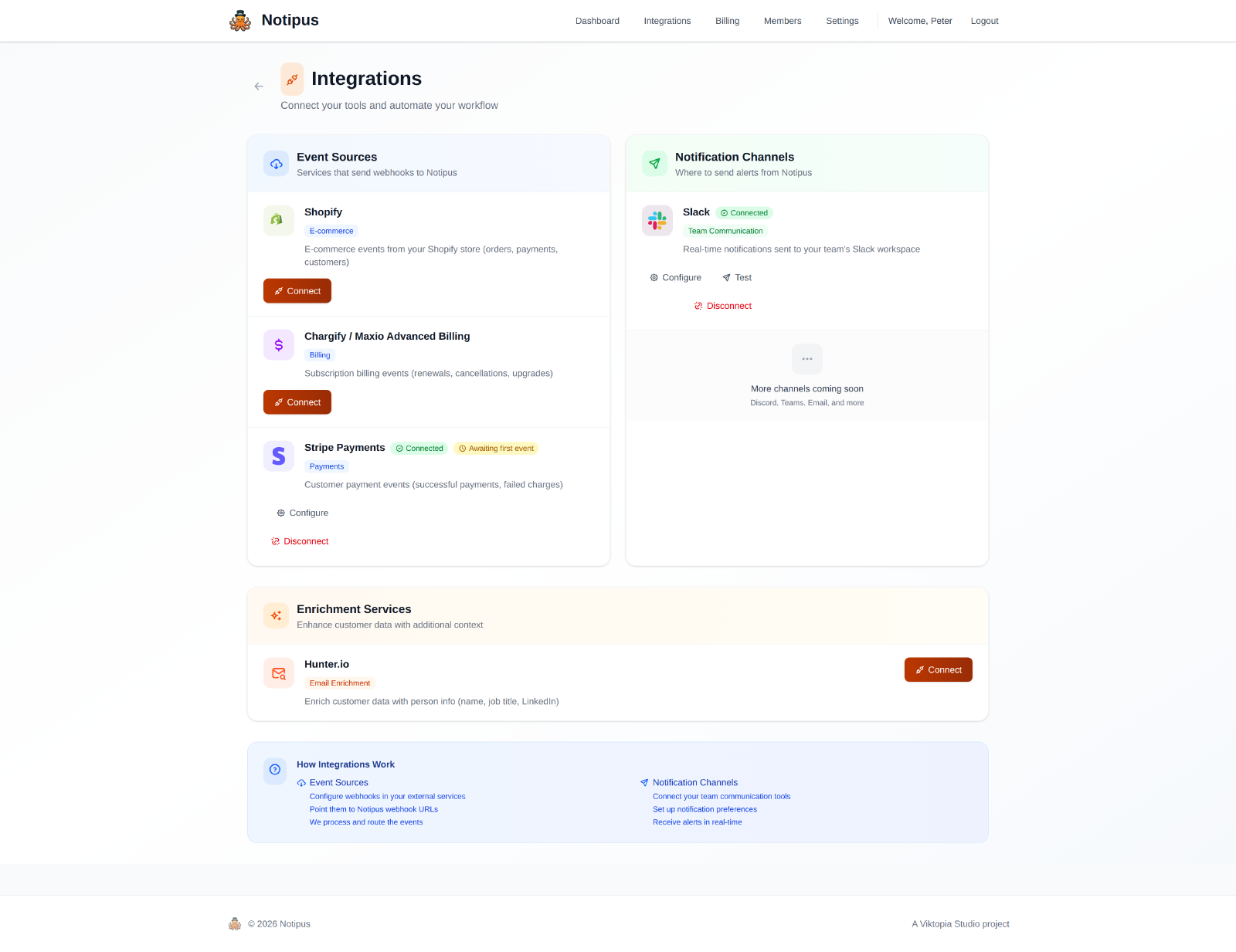
The integrations screen in Notipus — event sources on the left, Slack on the right.
pricing
What Notipus costs
The Slack app itself is free to install. What you pay for is the volume of payment events Notipus processes on your behalf. There is a permanent free tier, so you can run the whole thing end to end before paying anything.
| Plan | Monthly | Billed yearly | Events per month |
|---|---|---|---|
| Free | $0 | $0 | 20 |
| Basic | $29 | $24/mo ($290/year) | 10,000 |
| Pro | $99 | $82/mo ($990/year) | 100,000 |
| Enterprise | $299 | $249/mo ($2,990/year) | 1,000,000 |
Prices in USD. Every paid plan includes a 14-day trial. Notipus is also open source, so self-hosting is an option at no licence cost. See the pricing page for what each plan includes.
privacy
What Notipus stores, and where to reach us
Notipus receives payment events from the billing tools you connect, enriches them with publicly available company information, and delivers the result to your Slack channel. Slack credentials are stored encrypted and used only to post to the channel you selected. We do not sell data, and we do not use your data to train models.
Our privacy policy sets out exactly what we collect, how long we keep it, which subprocessors are involved, and how to request access or deletion. It is written against the UK GDPR and the Data Protection Act 2018.
Need help or have a question before installing? Our support page has the details, or email [email protected] and we reply within two business days.
If you could go ahead and connect Slack, that'd be great.
Free plan available. Paid plans include a 14-day trial.